Choosing a blogging platform can feel confusing when you have several websites offering different publishing options. You might discover UploadBlog.com while searching for a Blogspot alternative, but are these websites actually offering the same services? Choosing the wrong platform can limit your publishing control, customization, and long-term growth. This guide explains what UploadBlog.com offers, how Google Blogger works, and which alternatives are worth considering before you invest your time in a blogging website.
What Is UploadBlog.com?
Understanding the website before choosing it as a blogging solution
UploadBlog.com is an online publication featuring informational content across different subjects, including technology, artificial intelligence, business, and digital topics.
Its public website provides readers with articles and guides. It also provides a contact route for people interested in communication and potential publishing opportunities.
However, there is an important difference between an online publication and a traditional blogging platform. A blogging platform normally allows users to register accounts, create their own websites, manage posts, and control their publishing settings.
The public-facing information available for UploadBlog.com does not establish that it offers the same self-service blog creation features as Google Blogger. Therefore, visitors should check its current services before treating it as a direct Blogspot replacement.
Why Are People Searching for an UploadBlog.com Blogspot Alternative?
People searching for an UploadBlog.com Blogspot alternative may have different publishing goals. Some want to create a personal website, while others want to publish guest articles or expand their online presence.
The difference matters because each activity requires different tools.
For example, someone who wants to build a personal blog needs an editor, hosting, website settings, and control over published content. A writer looking for guest publishing opportunities needs a website that accepts external contributions.
Understanding these requirements helps you select the right service.
Common reasons include:
- Finding an easy blogging platform for beginners.
- Publishing articles without advanced technical knowledge.
- Building a personal website or writing portfolio.
- Getting more customization options.
- Improving search engine visibility.
- Finding guest posting and content distribution opportunities.
- Exploring alternatives to Google Blogger.
Is UploadBlog.com the Same as Blogspot?
No. UploadBlog.com and Blogspot should not automatically be considered the same type of service.
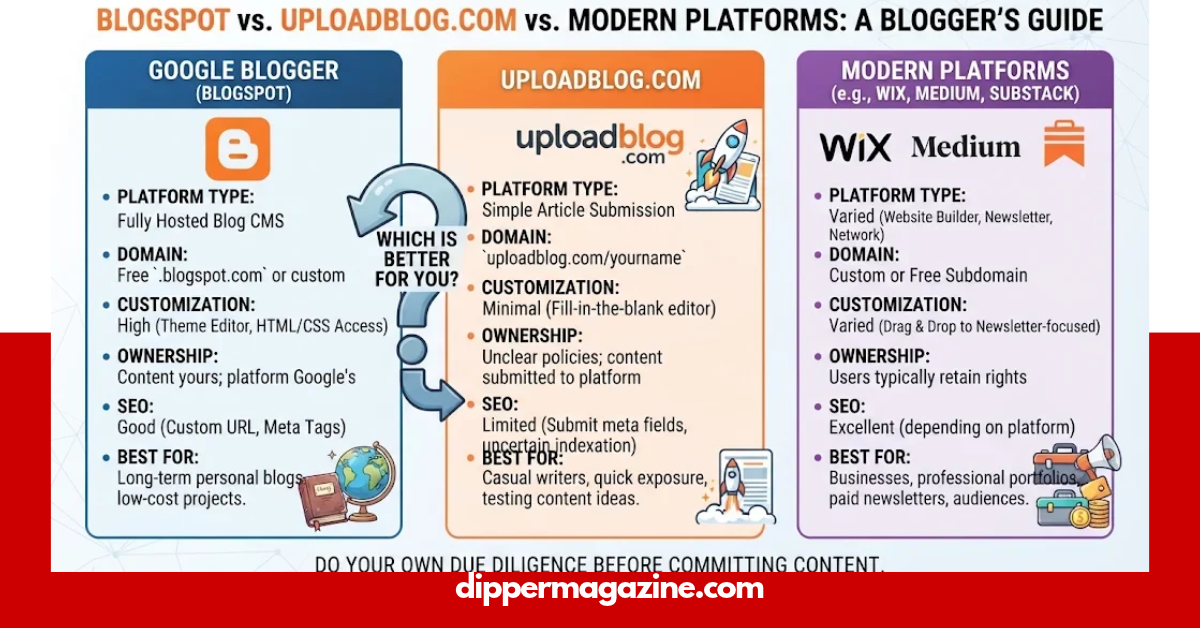
Google Blogger, commonly associated with Blogspot, is a blogging service that lets users create and manage their own blogs. Users can publish posts, change themes, manage authors, and connect custom domains.
UploadBlog.com operates publicly as an online publication. Its public pages do not clearly demonstrate an equivalent self-service blog dashboard.
This distinction is important when deciding where to publish your content.
| Feature | UploadBlog.com | Google Blogger (Blogspot) |
| Main purpose | Online publication | Blog creation and management |
| Personal blog creation | Not publicly confirmed | Yes |
| Article publishing | Publishes articles | Users publish their own posts |
| User dashboard | Not publicly confirmed | Yes |
| Categories | Public topic categories | Blog labels and organization |
| Custom themes | Not confirmed as a user feature | Yes |
| Custom domain | Not confirmed | Yes |
| Content backup | Not confirmed as a user feature | Yes |
| Guest contributions | Contact the website | Invite authors |
| Best suited for | Reading and exploring published content | Running a personal blog |
This comparison reflects publicly documented features, not private or unpublished services.
What Features Does UploadBlog.com Offer?
The public website provides several features that make it useful as a content destination.
1. Multiple Content Categories
UploadBlog.com organizes its articles into different subject areas. These include:
- AI tools
- Technology and gadgets
- Gaming
- Business and finance
- General blog content
This category structure helps visitors discover articles based on their interests.
2. Informational Articles and Guides
The website publishes educational articles, reviews, technology discussions, and practical guides.
Readers can explore different subjects without creating a personal blog or installing additional software.
3. Website Search Function
The homepage includes a search feature that allows visitors to look for articles using relevant terms.
This makes it easier to find particular topics instead of browsing every category manually.
4. Contact and Communication Options
The website provides a Contact Us section for visitors who want to communicate with its team.
Writers and businesses can use the available contact information to ask about publishing opportunities, collaborations, and other inquiries.
5. Content Discovery
Its homepage displays featured categories and selected articles. Visitors can explore different sections and discover content without navigating complicated menus.
These are publicly visible website features. They should not be confused with a complete set of personal blogging tools.
What Is Google Blogger and How Does Blogspot Work?
Google Blogger is a free blogging service that allows users to create and manage their own websites.
Blogspot is the domain associated with Blogger. When someone creates a blog, they can select an available address ending in blogspot.com.
Google provides an easy setup process that does not require coding knowledge.
According to Google’s official instructions, users can create a blog by signing in, selecting New Blog, entering a title, choosing an available address, and saving their settings.
Main Blogger Features
Blogger offers several useful features:
- Post editor: Write, edit, and publish articles.
- Themes: Change the appearance of your website.
- Custom domains: Connect a registered domain to your blog.
- Author permissions: Invite other people to contribute.
- Search visibility: Manage whether search engines can discover your blog.
- Content backup: Download and restore supported blog content.
- Comment management: Manage reader discussions.
These features make Blogger a practical option for beginners who want to establish an online presence.
What Are the Best UploadBlog.com Blogspot Alternative Platforms?
If you want to build your own website instead of reading or contributing to an existing publication, several alternatives deserve consideration.
Here are some popular options.
1. WordPress.com
WordPress.com is a popular choice for people who want more website-building flexibility.
It offers website themes, publishing tools, pages, and different plans for personal and professional projects.
Best for: Bloggers who want to grow a website, build a professional brand, or create a content-focused business.
Advantages:
- Website design options.
- Blog and page management.
- Multiple customization features.
- Options for expanding a website.
- Different hosting and pricing plans.
Considerations: Some advanced features require paid plans. Beginners may also need time to understand the available settings.
2. Medium
Medium is an online publishing platform focused on articles, personal stories, opinions, and educational content.
It provides a straightforward writing experience. Writers can publish without building a complete website from scratch.
Best for: Freelance writers, journalists, professionals, and people who want to share ideas with readers.
Advantages:
- Simple article editor.
- Clean reading experience.
- Existing reader community.
- Easy article publishing.
- Suitable for personal writing portfolios.
Considerations: Writers have less control over website design and branding than they would with an independent website.
3. Wix
Wix combines website building with blogging features.
Users can create pages, customize layouts, add images, and manage blog content through a visual interface.
Best for: Small businesses, personal brands, and creators who want a website with a blog.
Advantages:
- Visual website editor.
- Ready-made templates.
- Blog management features.
- Business website tools.
- Design customization.
Considerations: Pricing depends on the selected plan, and some business features require subscriptions.
4. Ghost
Ghost focuses on publishing, newsletters, and membership-based content.
It is particularly useful for writers who want to build a direct relationship with their audience.
Best for: Professional publishers, independent writers, and subscription-based publications.
Advantages:
- Clean writing interface.
- Newsletter publishing.
- Membership features.
- Professional publishing tools.
- Options for independent website management.
Considerations: Self-hosting requires technical knowledge, while managed hosting involves subscription costs.
5. Tumblr
Tumblr combines blogging with social networking.
Users can share short posts, photographs, artwork, links, videos, and other content.
Best for: Creative bloggers, hobbyists, artists, and people who enjoy community-based publishing.
Advantages:
- Multimedia publishing.
- Short-form blogging.
- Social interaction.
- Content discovery.
- Simple posting experience.
Considerations: It offers a different experience from traditional websites and may not suit businesses looking for extensive website control.
Complete Comparison of the Best Blogging Platforms
Choosing an alternative becomes easier when you compare each service according to its main purpose.
| Platform | Main purpose | Customization | Ease of use | Ideal audience |
| UploadBlog.com | Online publication | Not established for personal blogs | Easy to browse | Article readers |
| Blogger | Personal blogging | Moderate | Easy | Beginners |
| WordPress.com | Website and blogging | High, depending on plan | Moderate | Bloggers and businesses |
| Medium | Article publishing | Limited | Very easy | Writers |
| Wix | Website building | High | Easy to moderate | Small businesses |
| Ghost | Independent publishing | High | Moderate | Professional publishers |
| Tumblr | Social blogging | Moderate | Easy | Creative communities |
Customization descriptions are general assessments of the platforms, not guaranteed feature availability on every plan.
How to Choose the Right Blogspot Alternative
Before selecting a platform, identify what you want to achieve.
A personal blog, professional website, and guest publishing campaign require different features.
Consider these factors before making your decision.
1. Define Your Publishing Goals
Think about the type of content you want to publish.
For example:
- Personal experiences and lifestyle articles.
- Technology and software guides.
- Business and educational content.
- Photography and creative work.
- Professional articles and newsletters.
Your publishing goals will help narrow down the available choices.
2. Check Website Ownership and Control
Website ownership is an important consideration for long-term blogging.
Check whether the platform allows you to use a custom domain, export your content, manage your website settings, and maintain control over your publishing account.
Do not assume that publishing an article on another website gives you the same control as operating your own blog.
3. Compare Free and Paid Features
Some blogging platforms offer free plans, while others charge for hosting, premium themes, additional storage, or advanced features.
Before choosing a service, review:
- Monthly or annual pricing.
- Available storage.
- Custom domain requirements.
- Advertising restrictions.
- Publishing limits.
- Advanced SEO features.
A free platform may be sufficient for a beginner, while a growing business may benefit from a paid website.
4. Review SEO Features
Search engine optimization helps readers discover useful content through organic search.
Look for features such as:
- Custom page titles.
- Meta descriptions.
- Clean URLs.
- Mobile-friendly designs.
- Image optimization.
- XML sitemap support.
- Internal linking options.
- Structured data support.
Remember that having SEO settings does not guarantee higher Google rankings. Content quality, relevance, technical performance, and competition also influence search visibility.
5. Consider Long-Term Growth
Your requirements may change as your audience grows.
A platform that works for a small personal blog may not offer everything a business needs later.
Consider whether you can add new authors, publish different content formats, connect analytics tools, and expand your website without moving to another service.
Is UploadBlog.com a Good Choice for Guest Posting?
UploadBlog.com may be relevant to writers and digital marketers interested in contributing articles to online publications.
However, visiting a publication and operating a personal blog are two different activities.
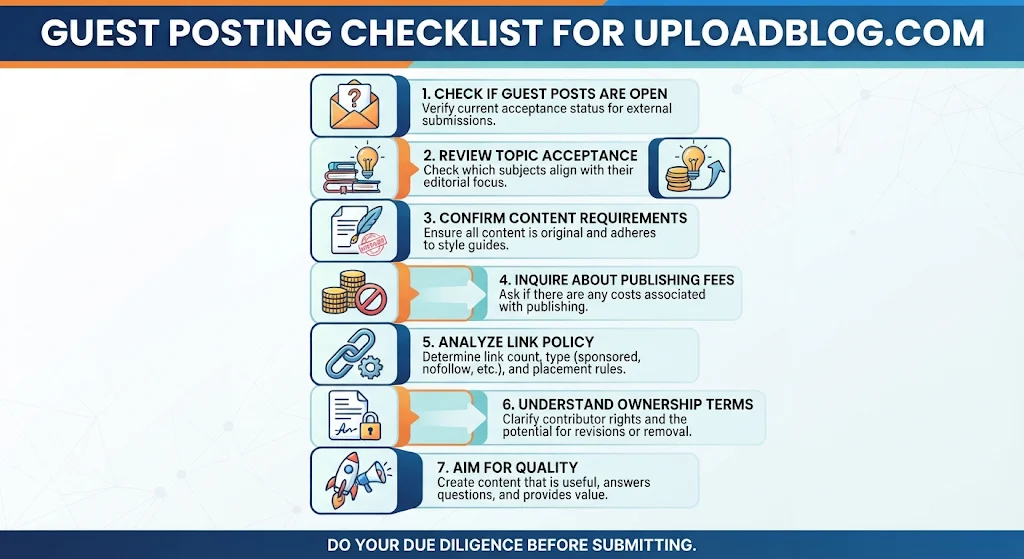
If your goal is guest posting, check whether the website currently accepts external contributions and ask about its editorial requirements.
Before submitting an article, confirm:
- Whether guest submissions are currently open.
- Which topics the editors accept.
- Whether original content is required.
- Whether the website charges a publishing fee.
- How many external links are permitted.
- Whether links are sponsored, nofollow, or otherwise qualified.
- Whether the contributor retains ownership of the article.
- Whether revisions or content removal are possible.
Do not assume that every article submission receives approval or provides a backlink.
A good guest post should answer readers’ questions, offer useful information, and fit the publication’s subject areas.
How to Start a Blog Using Google Blogger
If you want a simple starting point, Google Blogger provides a straightforward blog creation process.
Follow these steps to establish your first blog.
- Visit Google Blogger.
- Sign in using your Google Account.
- Select the option to create a new blog.
- Enter your preferred blog name.
- Choose an available Blogspot address.
- Save your blog settings.
- Select a suitable theme.
- Create your first blog post.
- Add relevant images and headings.
- Publish your article.
Google documents this setup process in its official Blogger Help Center.
How to Connect a Custom Domain
You do not have to keep the default Blogspot address forever.
You can purchase a domain from a domain registrar and connect it to Blogger.
The general process involves:
- Buying a domain name.
- Opening your Blogger settings.
- Selecting Custom Domain under Publishing.
- Entering your domain.
- Adding the required DNS records.
- Waiting for the settings to take effect.
- Checking that your website opens correctly.
Google explains that domain activation can take time and may require specific CNAME records.
Can You Improve SEO on a Blogspot Website?
Yes. You can improve a Blogger website’s search visibility by following basic SEO practices.
However, simply publishing articles does not guarantee organic traffic.
Focus on creating useful pages that answer specific questions and provide information readers cannot easily find elsewhere.
Here are some practical recommendations.
Write Helpful and Original Content
Create articles that solve real problems. Use clear explanations, practical examples, and reliable information.
Avoid publishing multiple articles that repeat the same ideas with slightly different keywords.
Use Descriptive Titles
Write titles that explain exactly what readers will find on the page.
For example, instead of using a general title such as “Technology Tips,” use a more specific title such as “How to Choose a Laptop for Everyday Work.”
Organize Articles With Headings
Use descriptive H2 and H3 headings to separate different topics.
A clear heading structure makes long articles easier to read and understand.
Optimize Images
Use relevant images and descriptive alternative text.
Compress large images to reduce unnecessary loading time, while maintaining acceptable visual quality.
Build Relevant Internal Links
Connect related articles so visitors can explore additional information.
Internal links also help search engines understand the relationship between different pages on your website.
Monitor Website Performance
Use tools such as Google Search Console to monitor search visibility, indexing, and search queries.
Use the information to identify pages that need improvements.
How Can You Back Up Your Blogger Content?
Backing up your articles is an important part of managing a website.
Unexpected account problems, accidental deletions, or website changes can affect your published content.
Google provides a content backup option through Blogger settings. You can also use Google Takeout to download supported blog data.
According to Google’s documentation, Blogger supports importing posts, pages, and comments through compatible backup files.
A sensible backup routine includes:
- Downloading your blog content regularly.
- Saving copies of important images.
- Keeping a separate copy of your theme.
- Storing backup files in a secure location.
- Checking that your backups are accessible.
If you are evaluating an UploadBlog.com Blogspot alternative, check its export and backup options before moving your existing articles.
What Should You Check Before Switching From Blogspot?
Moving to another publishing platform requires careful planning. You should protect your existing content and check how the new website handles important publishing features.
Use this checklist before making a final decision:
- Content migration: Can you transfer existing articles?
- URL structure: Can you maintain similar page addresses?
- Redirects: Can you redirect old URLs to new pages?
- Images: Can you transfer your existing media files?
- SEO settings: Can you manage titles, descriptions, and indexing?
- Domain ownership: Can you continue using your registered domain?
- Analytics: Can you connect website performance tools?
- Backups: Can you download your content whenever needed?
If you are considering an UploadBlog.com Blogspot alternative, do not move your complete website until you have tested the new platform with a small amount of content.
Which UploadBlog.com Blogspot Alternative Is Best for Different Users?
There is no single platform that works best for everyone.
Your ideal choice depends on your experience, publishing goals, budget, and preferred level of website control.
| User type | Recommended platform | Main reason |
| First-time blogger | Blogger | Simple blog creation |
| Professional blogger | WordPress.com | Website growth options |
| Freelance writer | Medium | Straightforward article publishing |
| Small business | Wix | Website and business tools |
| Newsletter creator | Ghost | Membership and newsletter features |
| Creative blogger | Tumblr | Multimedia and social publishing |
| Article reader | UploadBlog.com | Informational content and guides |
For someone exploring an UploadBlog.com Blogspot alternative, this table provides a useful starting point. Compare the available plans and features before making your choice.
Is UploadBlog.com Worth Exploring?
Yes, UploadBlog.com is worth exploring if you are interested in reading articles about technology, AI tools, gaming, business, and other subjects.
Its public website offers categorized content, featured articles, and a search function. These features make it useful as an informational website.
However, there is an important limitation: its public website does not establish that visitors can create independent blogs through personal accounts.
If you want to build and manage your own website, Google Blogger, WordPress.com, Wix, and Ghost are more clearly documented options.
The best approach is to choose a platform based on its actual features rather than its name or promotional claims.
Frequently Asked Questions
UploadBlog.com is an online publication, while Blogspot is associated with Google’s Blogger service. The public features of UploadBlog.com do not establish that it provides equivalent personal blog creation tools.
Visitors can browse its publicly available articles. However, its public pages do not establish a complete pricing structure for independent blog creation or publishing services. Contact the website for specific commercial terms.
A self-service blog creation feature is not confirmed by its public website. If you want your own blog, Google Blogger and WordPress.com provide documented website creation options.
Google Blogger is a suitable free starting point for beginners. Medium also offers an accessible publishing experience, although it follows a different model and provides less independent website control.
WordPress.com offers more website-building options and different plans for expanding a project. Blogger is easier to start with and works well for people who need a simple personal blog. The better option depends on your requirements.
Yes. Blogger supports content backups and importing compatible files. Before switching, check whether your new platform supports the required import format and plan how to handle existing URLs.
Conclusion:
Finding the right UploadBlog.com Blogspot alternative starts with understanding the difference between an online publication and a complete blogging platform.
UploadBlog.com provides informational articles across several categories, making it useful for readers exploring different subjects. However, if your goal is to create a personal website, publish your own articles, and manage your online presence, you should consider platforms with clearly documented blogging features.
Google Blogger is a practical starting point for beginners, while WordPress.com, Wix, and Ghost offer additional options for different publishing needs.
Before choosing, compare website ownership, customization, SEO features, content backups, and pricing. Choose a platform that supports your current goals and gives your content room to grow.
Have you tried any of these blogging platforms? Share your experience and help other readers choose the right publishing solution.