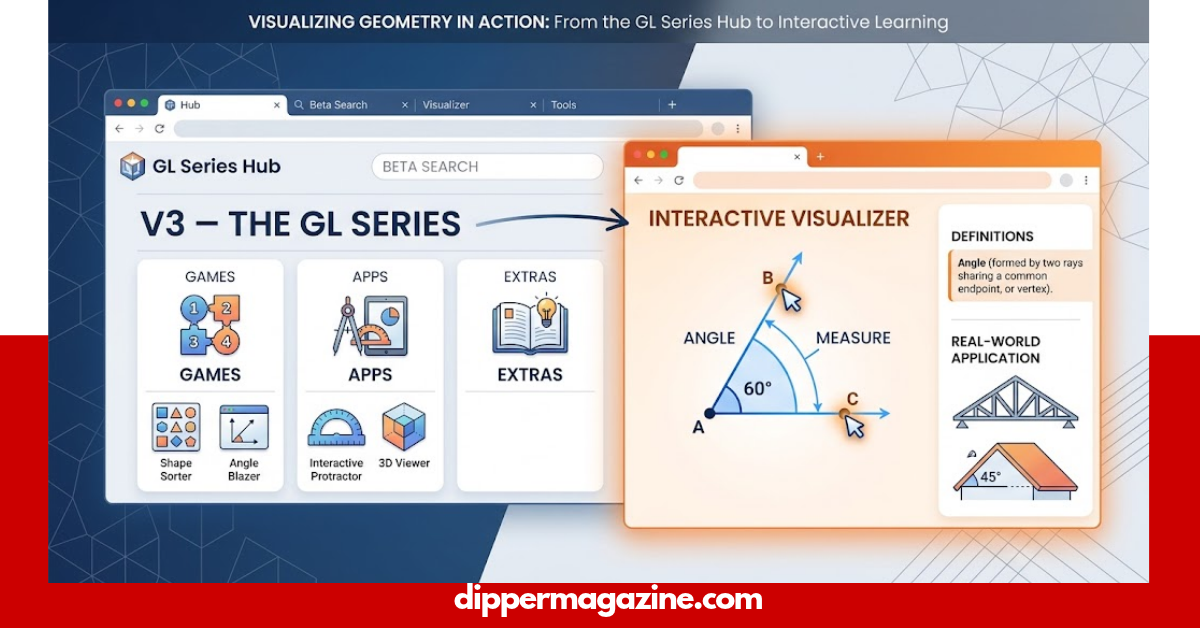
Geometry can feel difficult when shapes, angles, and measurements are presented only as formulas. Geometry Learn V3 attracts attention because the name suggests a digital way to explore geometry, but the public information around it is not always consistent. The visible project identifies itself as V3 – The GL Series and includes games, apps, extras, and a beta search feature.
What Is Geometry Learn V3?
Geometry Learn V3 is a name associated with a browser-based project identified publicly as V3 and The GL Series. Its publicly accessible page shows a simple web interface with a beta search function and sections connected with games, apps, and extras.
This is important because several websites describe the name as a complete online geometry-learning platform. However, the original public page does not provide enough information to confirm every educational feature claimed by third-party websites.
So, the safest description is that Geometry Learn V3 is a browser-based GL Series project, while its exact educational scope should be checked directly rather than assumed from its name.
What Does the “V3” Mean?
The V3 label appears to identify the version of the project currently presented on the public page. In normal software naming, “V3” usually means version three or a later iteration of an existing project.
However, the available public page does not provide a detailed development history explaining every change between previous versions. Therefore, it would be misleading to claim that V3 automatically means a professionally developed third-generation mathematics curriculum.
The verified point is simple: V3 is the version label displayed by the project.
What Does the Public Geometry Learn V3 Site Show?
The original public page gives users several visible elements:
| Element | What can be verified |
| Project name | V3 |
| Series name | The GL Series |
| Search | Beta Search |
| Search version shown | v0.32.12.7 |
| Games | Listed in the project navigation |
| Apps | Listed in the project navigation |
| Extras | Listed in the project navigation |
| Browser-based access | Yes |
| Formal school curriculum | Not established from the public page |
| Accreditation | Not verified |
| Official geometry syllabus | Not verified |
The project is therefore broader than the name alone suggests.
Is Geometry Learn V3 Really a Geometry Learning Platform?
This is the most important question.
The answer needs some care because online descriptions do not all agree. Several third-party pages describe Geometry Learn V3 as an interactive resource for shapes, angles, measurements, transformations, and spatial reasoning. Other descriptions focus more heavily on its browser-based games and GL Series structure.
The public project itself does not clearly display a complete geometry curriculum on its main page. It does not provide enough visible evidence to confirm formal lessons, assessments, teacher materials, accreditation, or a complete school syllabus.
That does not mean the project has no educational value. It means readers should distinguish between verified features and claims made elsewhere online.
What Geometry Topics Are Important for Learners?
If you want to use any digital resource to improve geometry, it helps to know the major topics you should study.
A strong geometry learning plan can include:
- Points, lines, and line segments
- Types of angles
- Parallel and perpendicular lines
- Triangles
- Quadrilaterals
- Polygons
- Circles
- Perimeter
- Area
- Surface area
- Volume
- Coordinate geometry
- Transformations
- Symmetry
- Congruence
- Similarity
- Geometric reasoning
- Proofs
These topics help learners move from simple shape recognition toward deeper mathematical reasoning.
How Can Visual Learning Help With Geometry?
Geometry is naturally visual. A student can understand a concept more easily when they can see how a shape changes instead of only reading a formula.
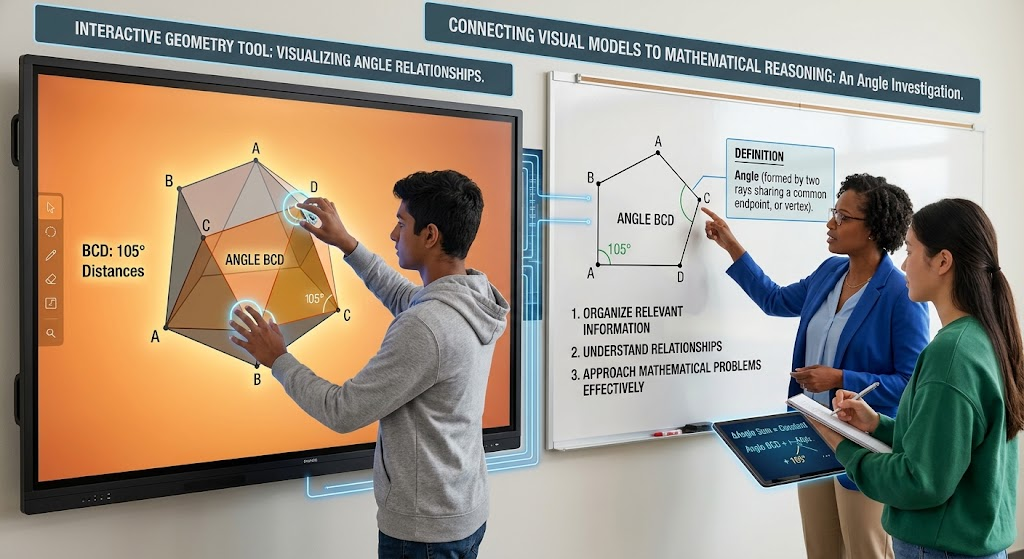
The U.S. Institute of Education Sciences recommends using visual representations as part of mathematical problem solving. Its guidance explains that visual representations can help students organize relevant information, understand relationships, and approach mathematical problems more effectively.
This makes interactive geometry tools potentially useful as supporting resources. The important part is not simply clicking through an activity; students should connect the visual model to mathematical language, measurements, and reasoning.
Why Interactive Geometry Can Be Useful
Interactive learning can make abstract ideas easier to see.
For example, when studying a triangle, a learner can think about:
- The number of sides.
- The number of angles.
- The relationship between its angles.
- The effect of changing side lengths.
- The difference between different triangle types.
- How measurements affect area.
This approach encourages understanding rather than simple memorization.
Research-based guidance from IES also recommends connecting representations with mathematical ideas and helping students explain their thinking.
Geometry Learn V3 vs. Traditional Worksheets
A worksheet and an interactive website can serve different purposes.
| Learning method | Main strength | Possible limitation |
| Textbook | Detailed explanations | Can feel static |
| Worksheet | Repeated practice | Limited interaction |
| Diagram | Strong visual support | May not show change |
| Interactive tool | Exploration and visual feedback | May not provide a complete curriculum |
| Teacher instruction | Immediate explanation | Depends on teacher availability |
| Practice problems | Builds solving skill | Requires good question quality |
The strongest approach often combines several methods.
For example, a learner can read a geometry concept, explore a visual model, solve practice problems, and then explain the solution without assistance.
Can Geometry Learn V3 Replace a Geometry Course?
It should not automatically be treated as a replacement for a complete geometry course.
The public project does not provide enough evidence to establish a full curriculum, formal assessment system, recognized certification, or alignment with a particular school’s mathematics standards.
For serious academic study, use a structured textbook, school course, teacher-supported program, or established mathematics curriculum as the main learning path.
A browser resource can then provide additional practice or exploration.
How Should Students Use Geometry Learn V3?
If you decide to explore the project, use it with a clear learning goal.
A simple study routine
Step 1: Choose one topic.
Start with something specific, such as angles, triangles, or area.
Step 2: Learn the basic rule.
Understand the definition before trying to solve problems.
Step 3: Use visual examples.
Look at diagrams and identify the measurements or relationships.
Step 4: Solve without help.
Try a few problems on your own.
Step 5: Explain your answer.
Say why your solution works instead of only giving the final number.
Step 6: Review mistakes.
Find the exact step where your reasoning went wrong.
This method is stronger than simply repeating answers.
Is Geometry Learn V3 Good for Beginners?
It may be useful for learners who enjoy browser-based exploration, but beginners should first check whether the material they are using actually matches their current mathematics level.
A beginner should start with basic concepts such as:
- Points and lines
- Basic angles
- Simple shapes
- Perimeter
- Area
- Triangle properties
- Basic coordinate ideas
Once those ideas become comfortable, the learner can move toward transformations, similarity, congruence, and proofs.
The goal should always be understanding, not simply finishing activities.
How Can Teachers Use Interactive Geometry Resources?
Teachers can use digital resources as an additional classroom activity.
For example, a teacher might introduce the concept of angles on the board, allow students to explore visual examples, and then return to paper-based problems.
IES guidance supports the use of visual representations and encourages students to connect those representations with mathematical notation and reasoning.
Teachers should also check the content before assigning an unfamiliar website to students.
How Can Parents Check a Geometry Website?
Parents should look beyond an attractive interface.
Before allowing regular use, check:
- The exact website address.
- Whether the site contains unexpected redirects.
- Whether it asks for unnecessary personal information.
- Whether downloads are required.
- Whether external links are clearly identified.
- Whether the mathematics content is accurate.
- Whether the activities match the child’s age and level.
- Whether the resource supports, rather than replaces, formal learning.
A simple browser game does not automatically become an educational curriculum because its name contains the word “geometry.”
What Are the Main Benefits of Learning Geometry Digitally?
Digital geometry activities can offer several useful learning opportunities when the content is accurate and well designed.
Visual understanding
Students can connect mathematical rules with shapes and diagrams.
Active practice
Learners can work with problems instead of only reading explanations.
Immediate exploration
Changing a shape or measurement can help students notice relationships.
Independent study
Students can review concepts at their own pace.
Better problem-solving habits
When digital activities require reasoning rather than guessing, they can support mathematical thinking.
However, the quality of the activity matters more than the fact that it is digital.
What Are the Limitations of Geometry Learn V3?
The biggest limitation is uncertainty about the exact scope of the public project.
The visible site identifies itself as V3 and the GL Series and provides navigation for games, apps, extras, and beta search. It does not, on its main public page, establish itself as an accredited geometry course or complete academic curriculum.
There is also a difference between what the original project displays and what third-party articles claim about it.
For that reason, readers should verify individual features before relying on them.
What Makes a Good Geometry Learning Resource?
A useful geometry resource should do more than provide answers.
Look for these qualities:
| Quality | Why it matters |
| Clear explanations | Helps learners understand new ideas |
| Accurate diagrams | Prevents visual confusion |
| Worked examples | Shows how a solution develops |
| Practice questions | Builds confidence |
| Feedback | Helps identify mistakes |
| Increasing difficulty | Supports gradual progress |
| Mathematical vocabulary | Improves communication |
| Visual representations | Makes relationships easier to understand |
| Reasoning tasks | Builds deeper problem-solving ability |
| Progress review | Shows which topics need more practice |
IES guidance specifically highlights systematic instruction, mathematical language, representations, and problem-solving as useful parts of mathematics intervention.
Geometry Learn V3 Safety and Trust Checklist
Before using the site regularly, take a few minutes to verify what you are accessing.
Check the domain
Make sure you are visiting the intended website rather than a copy or unrelated page.
Avoid unnecessary downloads
A basic browser activity should not require you to install unknown software simply to view ordinary content.
Protect personal information
Do not enter sensitive information into an unfamiliar educational site unless you know why it is required.
Check external links
Be careful when a page sends you to unrelated websites.
Verify educational claims
Do not assume that words such as “advanced,” “professional,” or “complete course” prove educational quality.
Frequently Asked Questions
Geometry Learn V3 is a name associated with a browser-based project identified publicly as V3 and The GL Series. Its visible interface includes a beta search function and navigation connected with games, apps, and extras.
Yes. A publicly accessible project at letslearn.neocities.org identifies itself as V3 and The GL Series.
Its name and several online descriptions connect it with geometry learning, but the public project does not provide enough evidence to confirm a complete geometry curriculum. Verify the actual content before relying on it for formal study.
V3 appears to be the project’s version label. The public page displays “V3” and “The GL Series,” but it does not provide a detailed history explaining every previous version.
It may be useful as a supplementary browser resource, but students should not automatically treat it as a replacement for a structured mathematics course. Check the content, website, and activities before regular use.
They can support learning when they help students connect visual representations with mathematical ideas and problem-solving. IES guidance recommends visual representations as part of effective mathematics problem solving.
Conclusion
Geometry Learn V3 is an interesting search term, but the most useful answer is not to repeat every claim found online. The publicly accessible project identifies itself as V3 – The GL Series and shows games, apps, extras, and beta search functionality.
If you want to explore it, start carefully and judge the actual material you find. For academic geometry, combine interactive activities with explanations, diagrams, practice questions, and a structured curriculum. Visual learning can be especially helpful because research-based mathematics guidance supports using representations to help learners understand relationships and solve problems.
The best geometry learning happens when students move beyond clicking answers and can explain why an answer is correct. Use digital tools to explore, practice, and visualize—but keep understanding and mathematical reasoning at the center.